Your CCTV sees it.
TrueCount counts it.
We build custom AI software for your business that counts dishes, drinks, boxes, bags, garments or products automatically from your existing cameras — running 24/7 on a computer at your site, with the exact time of every item and a daily report.
- No new camera system needed in most cases
- Video stays at your business
- Free check on your own footage
Your cameras record everything. Nobody counts it.
Most businesses already pay for CCTV — but the footage only gets watched after something goes wrong. Meanwhile, counting is still done by hand, on paper, or not at all.
Stock goes missing
Drinks not rung up, products leaving without a record, dispatch numbers that don't match. Small gaps every day add up to real money.
Manual counting wastes time
Staff counting units, bags or garments by hand is slow, tiring and error-prone — and nobody can check it afterwards.
No evidence when it matters
When there's a dispute, you scroll through hours of video. TrueCount gives you the count, the exact time and the frame behind every item.
From your camera to automatic counts in 4 steps
Every system is built for your business. We start by looking at your real cameras — before you pay anything.
Tell us what to count
Send 30 seconds of footage from the camera that sees the counting point. A phone recording of your CCTV screen also works.
FreeWe check your camera angles
We review angle, light and visibility, and tell you exactly what to adjust — or whether a better-placed camera is needed.
FreeWe build your software
A custom AI model and counting logic, trained on your products and your camera view, with the reports you need.
Custom buildIt runs 24/7 at your business
Installed on a PC at your site and connected to your cameras. Every item is counted with its time, and you get daily reports.
You own itOne counting engine, built around your business
If items pass a fixed point your camera can see, we can usually build a counter for it.
Restaurants & bars
Count dishes leaving the kitchen and drinks leaving the bar, then compare with what was charged.
Factories & production
Count finished units per line, per shift and per hour — automatically, without stopping production.
Warehouses & dispatch
Count bags, boxes and packages leaving the loading area, and check them against your dispatch records.
Dry cleaners & laundries
Count garments pressed per station and keep a timestamped photo of every item received at the counter.
Bakeries & food production
Count trays, packs and finished products coming off the line or handed over at the counter.
Your use case
Mills, farms, construction yards, retail… Tell us what you need counted and we'll tell you honestly if it's possible.
Real camera footage. Real counts.
These are real CCTV cameras, not studio videos. The AI detects each item, follows it, and counts it only when it crosses the counting point.
- Each item counted once — no double counting
- People and other objects are ignored
- Every count saved with its exact time
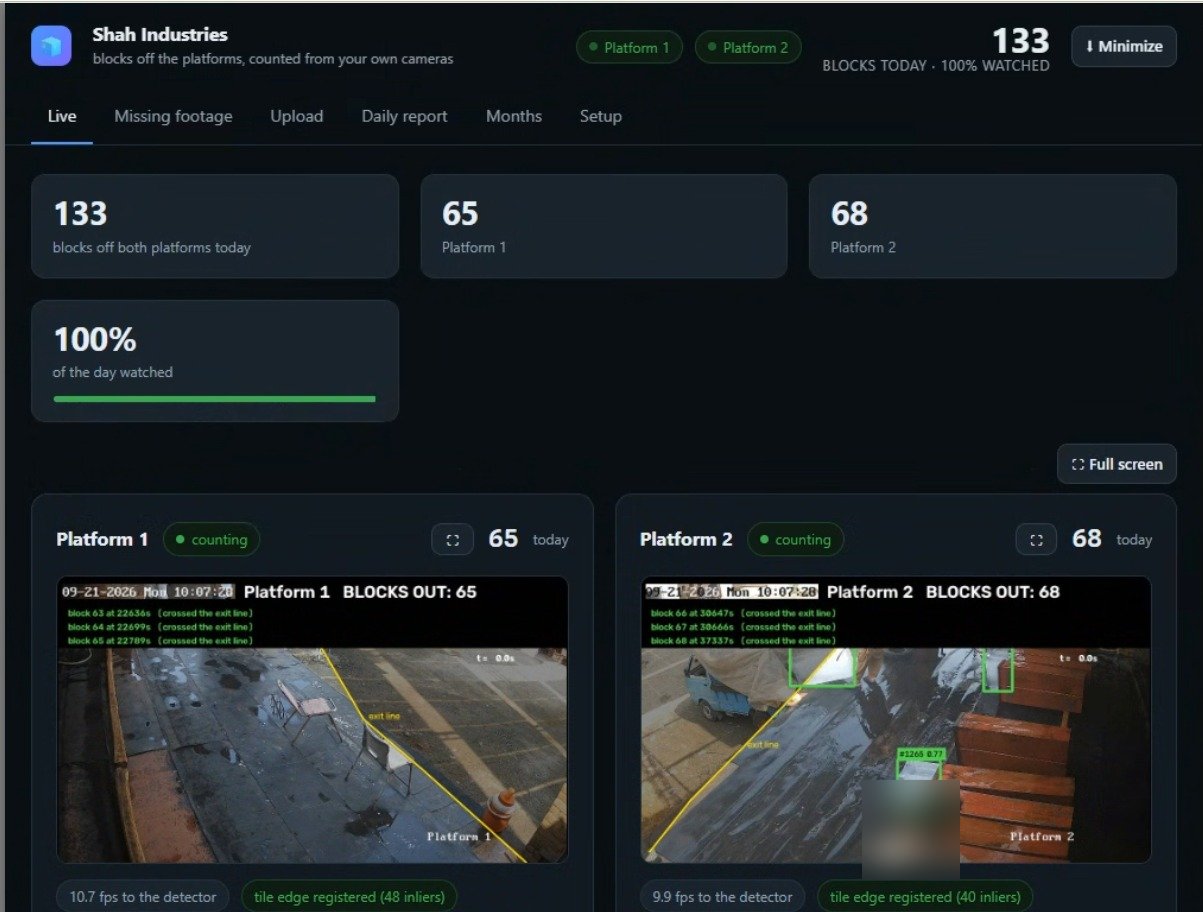
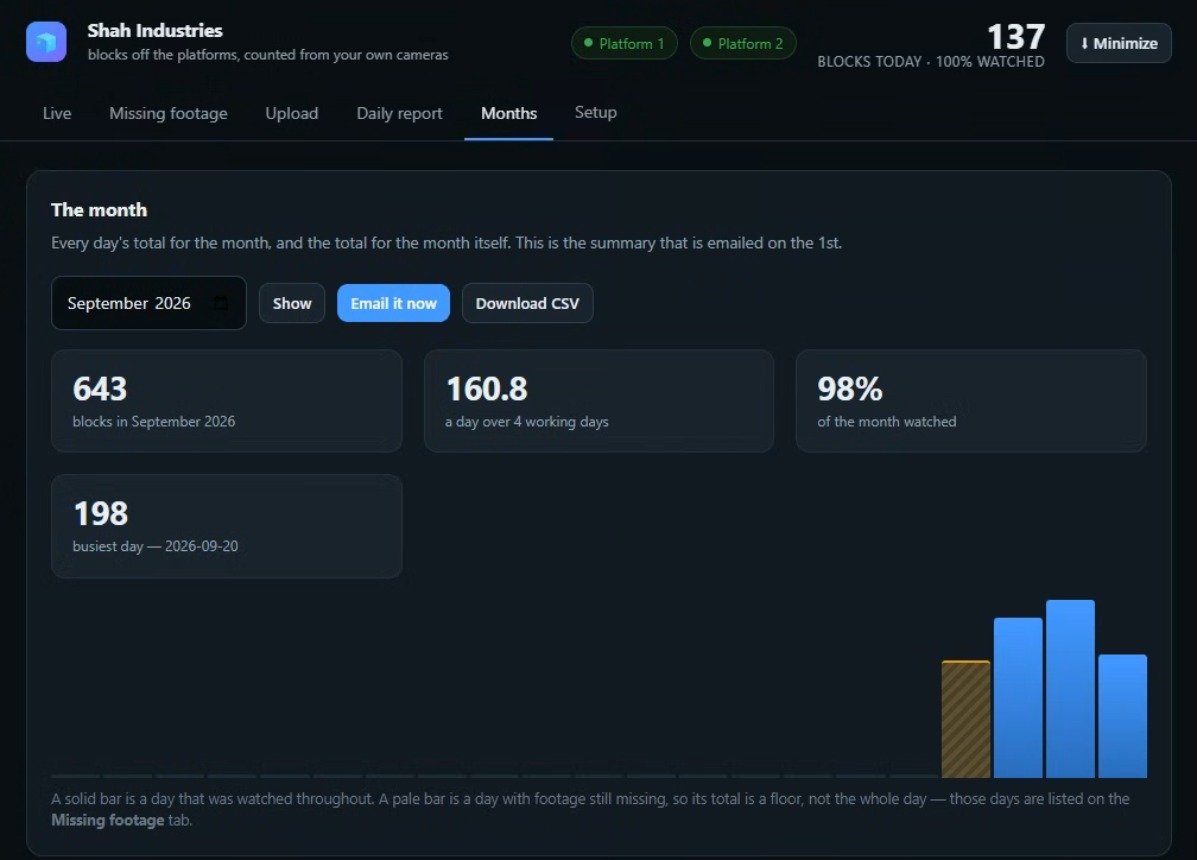
Live at an ice factory, on their own cameras
Shah Industries wanted to know exactly how many ice blocks left their two loading platforms each day. We connected TrueCount to the CCTV they already had.
- Daily per-platform report sent by email (CSV)
- Recovers automatically after power cuts
- Monthly summary on the 1st of every month
More than a number on a screen
Timestamped counts
Every item is logged with the date, time and camera — so you can see exactly when things happened.
Evidence frames
Keep the image behind each count, so any number can be checked in seconds instead of hours of video.
Daily & hourly reports
Totals per day, hour, camera or station — by email or CSV, ready for your records.
Live dashboard
See today's count, each camera's status and the monthly summary at a glance.
Built for real conditions
Restarts by itself after power cuts or reboots and keeps counting, without anyone touching it.
Private by design
Processing happens on your PC. We count items, not identities — no face recognition.
Installed at your business. Your video stays with you.
TrueCount runs on a computer at your site, connected to your existing cameras over your local network. Only the counts and reports leave the building.
The computer
Light jobs can run on a normal office PC. Heavier jobs (several cameras, fast movement) need a PC with an NVIDIA graphics card. We tell you exactly what's needed before you buy anything.
The cameras
Most existing cameras work. If the angle is wrong we tell you how to adjust it; sometimes one simple, well-placed camera gives far better results.
Cloud option
For multi-site businesses, processing can also be arranged in the cloud with a central dashboard. We'll discuss what fits your setup.
What makes a camera work well
- A clear view of the counting pointThe place where items pass — the pass, the bar, the platform, the table.
- Good angle and lightIdeally from above, not blocked by people or machines.
- Items big enough in the frameNot tiny, far-away objects in a corner of the image.
- Access to the video streamFrom the camera or your DVR/NVR, on a computer at your site.
The simple rule
If a person watching your video can clearly see each item and count it without doubt, the AI can learn to count it too. If the item is blurry, too far away or hidden, the AI can't count it reliably either — so we check this first, for free.
Custom software, priced for your setup
There is no one-size-fits-all price, because every system is built for one business. After the free camera check, you get a clear, fixed quote.
Your price depends on
We keep it simple and transparent. The main factors are:
Camera checkFree
Send 30 seconds of footage. We tell you if it can be counted, what to adjust, and what hardware you need — no obligation.
One-time build
Custom software installed on your PC. It's yours — no mandatory monthly fee for self-hosted systems.
Low-risk payment
You pay most of it only once the system is working on your cameras and you're satisfied.
Talha Khalid
Founder & AI / Computer Vision Engineer
I build every TrueCount system myself — from the AI model to the counting logic, the reports and the installation. My work is in real-time computer vision: object detection, tracking and counting on live camera streams. You talk directly to the engineer who builds your software.
Questions business owners ask
Do I need to buy new cameras?
Does it work with every camera?
What computer do I need?
How accurate is it?
Does my video leave my business?
Does it recognise people or faces?
How long does it take?
How much does it cost?
Which countries do you work with?
What do I need to send for the free check?
Find out if your cameras can count
Tell us what you want to count. We'll review your setup and reply within one business day — no obligation.
Your cameras are already recording. Let them count.
Send 30 seconds of footage and find out — for free — what TrueCount can count in your business.